
🇧🇩 Analyser Interface · LIS

Analyser interfacing for diagnostic centers in Bangladesh

Your CBC counter and chemistry analyser already send every result down a cable. A technician still reads the printout and types it into the report — the slowest step in turnaround and the commonest source of a wrong number. SihatSuite listens to the machine, matches the run to the tube, and puts the values in front of the technician to accept, not to retype.

  • Mindray, Sysmex, Roche, Beckman, Erba, Biosystems and semi-auto machines
  • A technician accepts every run — the machine never signs a report
  • Keeps working through power and internet cuts

Built for the machines a Bangladeshi lab actually owns

🔌

Speaks what the machine speaks

ASTM for haematology and chemistry analysers from Mindray, Sysmex, Roche, Beckman, Erba and Biosystems; HL7 for newer Mindray and Sysmex machines and immunoassay analysers; plain line text for semi-auto machines like a Humalyzer or Chem-7. Serial or network — whatever port is on the back.

🏷️

A lab number the machine can read

Every tube label carries a short six-digit lab number with its own barcode, beside the full sample barcode. A barcode-reading analyser reads it; a machine without a reader has the technician type six digits, the same thing they do today.

📥

Results land in an inbox, not the report

Each run appears on the Reports page already matched to the patient's invoice, with every value beside the reference range and beside what the report said before, abnormal values flagged. One button accepts it into the report as submitted — the same step as typing the values in.

🧑‍🔬

The technician stays in charge

A rerun replaces the earlier candidate instead of sitting beside it. A run the technician does not trust is rejected with a reason and kept for audit. Interfacing removes the typing, not the judgement — the machine never signs a report.

🔋

Power cuts and dead internet are Tuesday

The Lab Bridge on your lab PC writes every run to disk before anything else happens to it. No internet: runs queue and upload when it returns, in order. Power gone: the queue is still there when the PC comes back. Nothing is lost.

🧭

Binding without a signal

Semi-auto machines send only a run number. Those runs show on the lab PC beside today's worklist — every tube collected, with lab number, patient and test — so the technician picks the right one. The worklist is cached, so this works offline too.

Inside SihatSuite

From the machine to the printed report

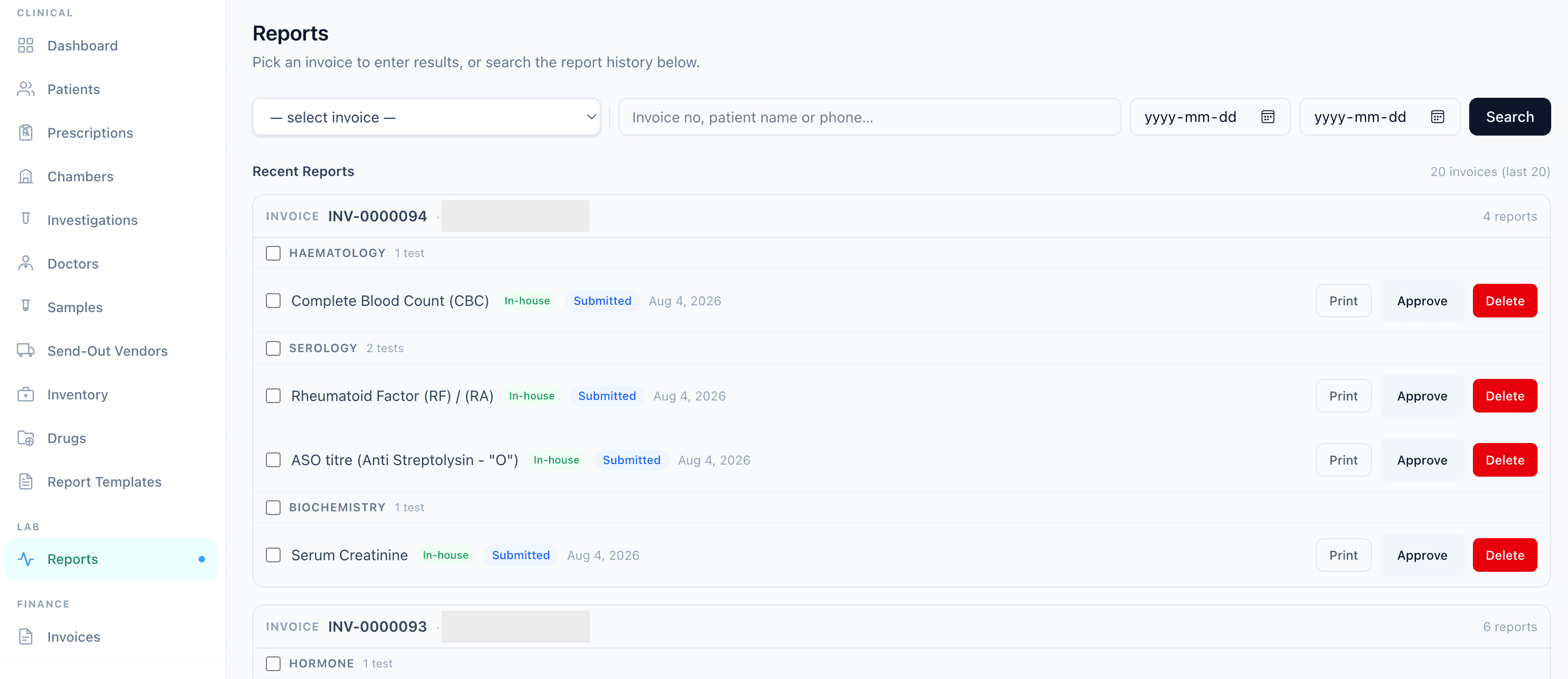
The inbox where a run waits for the technician, and the batch-printed reports it ends up in — the same report flow the centre already runs.

SihatSuite Analyser Inbox showing a CBC run from a haematology counter bound to a patient's lab number, each value beside the previous value and reference range with an abnormal flag, and an Accept into report button

Analyser Inbox

মেশিনের রেজাল্ট সরাসরি রিপোর্টে — টেকনিশিয়ান দেখে গ্রহণ করেন, টাইপ করেন না।

SihatSuite reports screen grouping multiple pathology reports by invoice for approval and batch printing

Batch report printing

ছয়টা রিপোর্ট, এক ক্লিকে প্রিন্ট।

Why SihatSuite

Built to fit your center

Unlimited analysers

One price per centre, however many machines it runs.

Installed by us

Our team sets up the Lab Bridge and maps each machine on the first visit.

Same report flow

Accepted runs go through the approval, print and WhatsApp steps you already use.

৳1,500/month

An add-on to any Diagnostic Management subscription.

Frequently asked questions

Which analysers does it work with?+

Any machine that sends results as ASTM, HL7 or plain text on a serial or network port — which covers the haematology and chemistry analysers from Mindray, Sysmex, Roche, Beckman, Erba and Biosystems, newer Mindray and Sysmex machines and immunoassay analysers on HL7, and semi-auto machines such as the Humalyzer and Chem-7 families that print each result as a line of text. The first installation at your centre includes capturing what each machine actually sends and confirming every result code maps to the right report field.

How does the machine know which patient a tube belongs to?+

Every tube label now carries a short six-digit lab number with its own barcode. A barcode-reading analyser reads it and reports it with the result; a machine without a reader has the technician type the six digits. Runs from semi-auto machines, which send only a run number, are bound to the tube on the lab PC from that day's worklist.

Does a result go into the report automatically?+

No, and that is deliberate. Results land in the Analyser Inbox, where a technician sees each value beside the reference range and the previous value, and accepts or rejects the run. Accepting moves the report to submitted exactly as manual entry does; the doctor approves it the same way. An option to auto-accept runs where every value is in range is planned for later, once enough labs have run the manual step.

What happens when the power or the internet goes?+

The Lab Bridge on your lab PC saves every run to disk before doing anything else. Without internet, runs queue and upload in order when it comes back; after a power cut, the queue is still there when the PC restarts. Binding a run to a tube also works offline, from a cached copy of the day's worklist.

Do I need a special computer or hardware?+

No. The Lab Bridge runs on the ordinary Windows PC that is usually already next to the analyser. Network analysers connect to that PC over the lab's LAN; serial ones use the cable and USB adapter the machine's own software already uses.

Can it tell the analyser which tests to run?+

Not yet. Barcode analysers can ask the host which tests were ordered for a tube — a host query — and that is planned for a later phase. For now the analyser runs its panel and the inbox keeps the results that were ordered on the invoice.

How is it installed and what does it cost?+

Analyser Interface is a ৳1,500 a month add-on to any SihatSuite subscription that includes Diagnostic Management, for as many analysers as the centre runs. Our team installs the Lab Bridge on your lab PC on the first visit, connects the machines, maps each one's result codes to your report fields, and watches the first real runs land.

Start free — and see it working for your center

Setup in minutes, support in Bangla and English. No credit card required.

Explore more: Pathology lab software · Diagnostic management software · Pricing