
Patients can follow their turn
Large Bengali serials show who is with the doctor and who is next. Names beside the numbers help patients recognise their turn without repeatedly asking reception.
SihatSuite add-on · Waiting Room TV
Give every patient a clear view of whose turn it is. Show the current serial, the next patient and the waiting queue on the TVs in your centre — connected to the appointments your staff already manage.
এখন কার সিরিয়াল, পরের জন কে — সবাই দেখুন টিভির পর্দায়।
See the actual board
See the three-doctor layout below, then try the interactive sample. The sample uses the actual TV board with fictional doctors and patients, so you can explore it without an account.
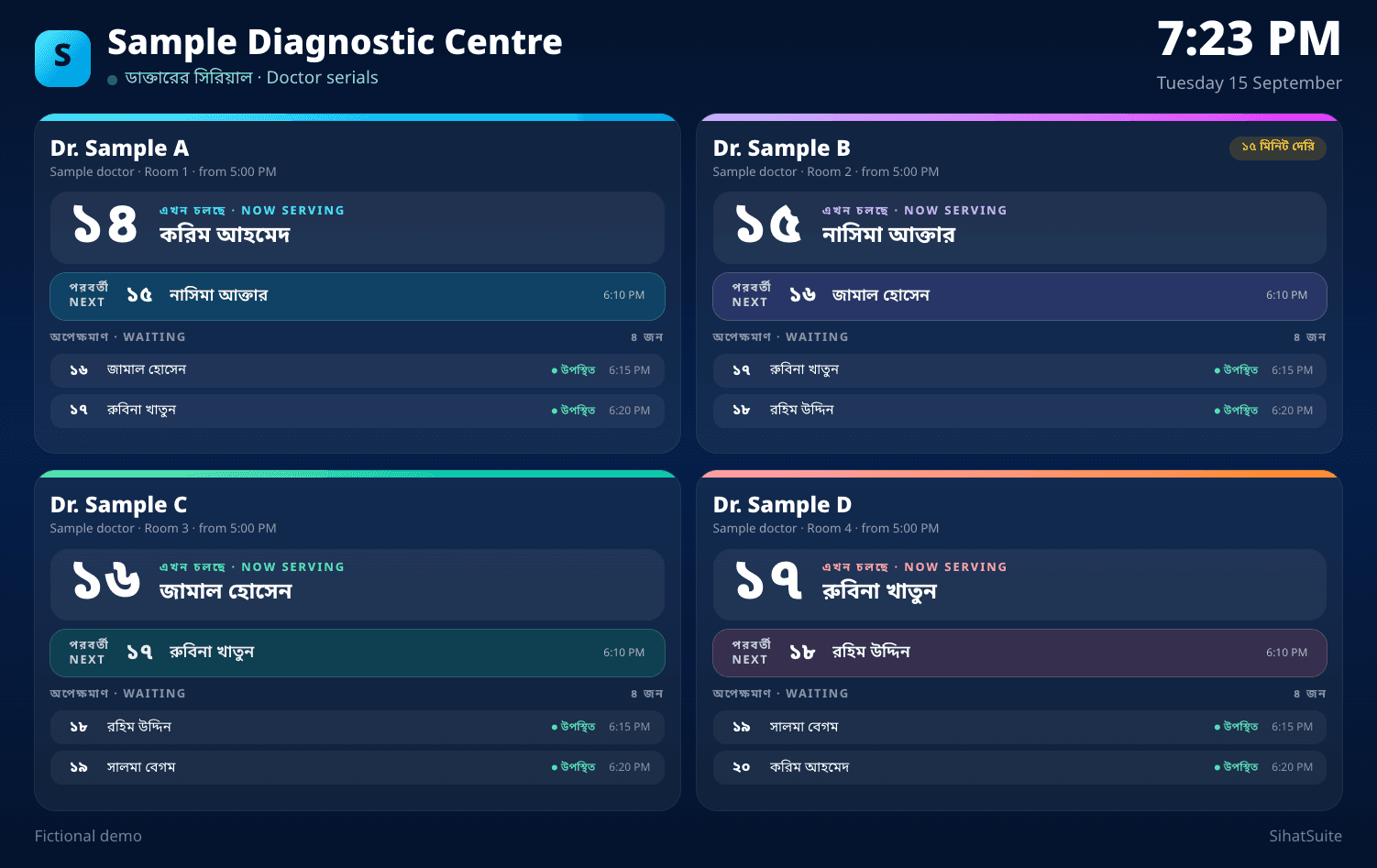
Fictional sample screen: four doctors share a waiting-room display, with a separate queue for each.
Large Bengali serials show who is with the doctor and who is next. Names beside the numbers help patients recognise their turn without repeatedly asking reception.
Show one doctor outside a chamber, or multiple doctors in a shared waiting area. Choose the doctors per TV; larger lists rotate through pages automatically.
Starting a consultation or marking a serial in consultation updates the TV on its next refresh, normally about five seconds later. There is no separate TV queue to maintain.
Designed for daily use
A waiting-room screen should be easy to manage throughout the working day. SihatSuite gives staff visible screen status and control over which TV is connected.
With the add-on active, open your SihatSuite /tv address in the display’s browser. It shows a short pairing code.
Open Appointments → TV displays, add a named screen and enter the code shown on the TV.
Select the doctors for that waiting area and enable sound if wanted. Check the browser’s sound, startup and sleep settings.
Planning your hardware? Ask us to check the TV or Android box and its browser before buying. Browser compatibility, Bangla voice support and automatic startup vary by device.
The add-on costs ৳500 per month for the whole centre, with any number of TVs. It requires an active Diagnostic Management subscription, billed separately. Contact us to activate it on your subscription.
Yes. The signed-in Waiting Room page remains included with Diagnostic Management. The paid add-on provides dedicated TV screens that stay paired without a staff login, with doctor selection per screen and optional sound.
A display with a compatible web browser and internet access. An Android TV box connected to a TV is a setup option; smart TV browsers vary. Ask us to check your browser and device before buying equipment. TVs, boxes and internet service are separate from the software subscription.
Yes. Choose which doctors each screen shows, or show every doctor with an open sitting today. Up to four sittings share the board; additional sittings rotate through pages.
A board that is already open keeps its last loaded queue and shows a reconnecting indicator after repeated failed updates. It resumes updates when the connection returns. New calls cannot reach the TV without internet, and loading or restarting the page requires a connection.
The board displays Bengali serial numbers and can chime when a new serial is called. Spoken announcements require a Bangla voice installed on the device. Some browsers require a press of OK to enable sound; autoplay and sound after a restart depend on browser settings.
No staff login is left on the TV. A manager pairs it using a short code shown on the screen. Patient names and serials are visible to the waiting room; phone numbers, ages and booking contact details are not included in the TV board.
Pairing is stored in the browser and normally survives restarts as long as cookies are retained. Private browsing, cleared browser data or remote unpairing requires a new code. Automatically reopening the page after a power cut depends on your device and browser setup.
Tell us how many waiting areas and visiting doctors you have. We can walk through the setup and subscription with you.